For DoorDash & multi-app food delivery drivers

Know which delivery shifts are worth repeating.

Compare your DoorDash and Uber Eats shifts after distance costs. See active and total hourly pay side by side, and count overlapping work hours once overall.

14-day free trial · No card required · No automatic charge.
No delivery-app passwords or data sharing with delivery platforms.

Full workspace: $7.99/month or $59.99/year (USD). Compare paid prices →

Actual Drovm Analysis · sample records

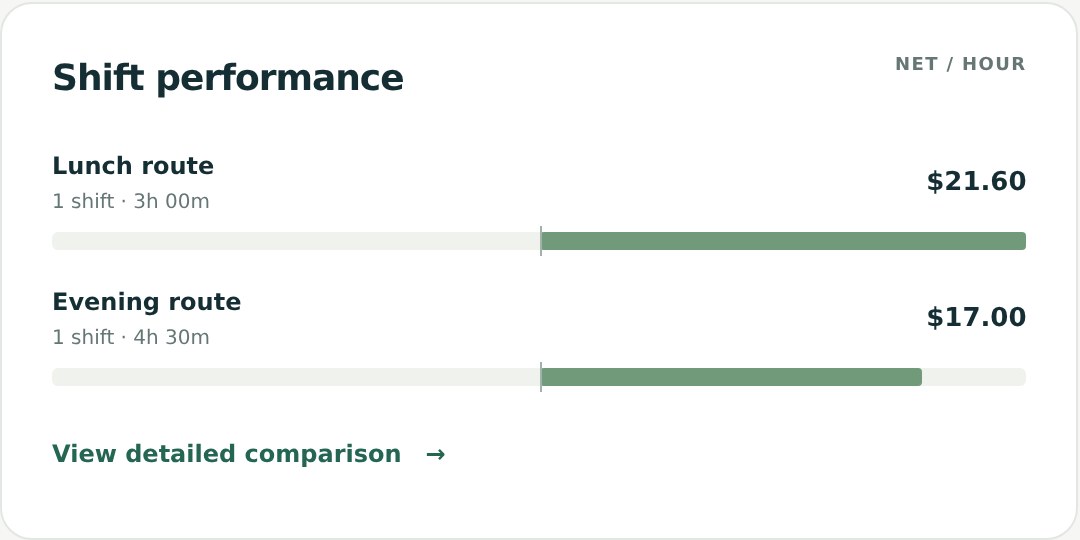
A bigger payout can mean a lower hourly result.

Actual Drovm Analysis ranks sample Lunch route at $21.60 net per hour and Evening route at $17.00.
The lunch shift earned $72; the evening shift earned $90. After distance costs, lunch earned more per work hour. See the full calculation ↓

From the driver’s seat

  • I do DoorDash and Uber Eats, and keeping track of both was getting messy. Nice to finally have everything in one place and see how the shifts actually compare.

    Mike J.

  • Pretty useful so far. Took me a bit to get familiar with the workspace, but the earnings and mileage breakdowns are helpful. Still exploring some of the other features.

    Sarah T.

  • I used to finish a shift, look at the payout, and call it a good day. Seeing how many hours and miles went into that money gives me a different perspective. That’s probably the biggest benefit for me.

    Chris M.

  • The screenshot upload is handy. I still check the numbers before saving, but I like having that option. Less typing after being out delivering all evening is always welcome.

    Jessica R.

  • Signed up for the trial after looking through the website. The sample data helped because I could actually see what I’d be using. Setup was pretty straightforward.

    David L.

  • The monthly goal is my favorite part. Nothing complicated about it—I just like opening the dashboard and seeing how close I am.

    Ashley B.

  • I only deliver part time, so I’m probably not using everything here yet. Mostly using the shift log and comparing my earnings per hour. Those two things alone have been useful.

    Brian K.

  • I deliver on an e-bike and this works for the stuff I want to track. Hours, miles, earnings, expenses. Good to have a record instead of trying to remember what I made last week.

    Daniel P.

  • I like it. My biggest challenge is remembering to log my shifts consistently. When I keep up with it, the comparisons are really helpful. Definitely more organized than the notes I was keeping on my phone.

    Amanda S.

  • Being able to look back at my shifts is what makes this worthwhile for me. I tend to remember the really good days and the terrible ones. Having the actual numbers in front of me helps.

    Kevin W.

  • Turns out my busiest nights aren’t always my best nights. Having the hours and mileage next to my earnings makes that a lot easier to see.

    LateNightRuns

  • Mostly using it for the shift log right now. Took a little clicking around to get familiar with everything, but once I entered a few shifts it started making sense.

    Marcus D.

  • DoorDash on one screen, Uber on the other, random numbers in my notes app lol. I needed something like this. Much easier having my shifts together.

    TwoAppsOneCar

  • E-bike delivery here. Being able to keep track of my miles, expenses and earnings together is really handy.

    PedalForTips

  • I like the monthly goals. I deliver around my regular job, so it helps to see where I’m at without adding everything up myself. Still need to get better about logging every shift.

    Nina R.

  • The shift comparisons are what sold me. I always thought lunch was my better shift, but I’d never actually kept decent records to check.

    LunchRush87

  • Honestly, just being able to pull up last week and see everything is nice. No digging through screenshots trying to remember what I worked.

    Alex T.

  • Pretty happy with it so far. There’s more here than I need for a couple of weekend shifts, but the overview is useful. I’ll probably get into the other features as I go.

    WeekendCourier

Drovm First Look

See how a saved shift becomes a clearer decision.

Watch a shift become an hourly comparison, see how distance costs affect the result, and follow goal progress in the real workspace. The tour uses example data.

Actual Drovm workspace shown with example data. No sign-in required to watch.

Start Your Free Trial

A discovery in the numbers

The bigger payout didn’t earn more per hour.

A sample report from the actual Drovm workspace. Two illustrative shifts show why active time, total time, and costs each matter.

Worked example · USD · one shift per label
Recorded resultLunch routeEvening route
Gross earnings$72.00$90.00
Total work time3h4h 30m
Active time2h3h
Gross per active hour$36.00$30.00
Distance24 mi45 mi
Estimated distance costs$7.20$13.50
Net per total work hour$21.60$17.00
Net per active hour$32.40$25.50

What this reveals: the lunch route brought in less money, but earned $4.60 more per work hour after the chosen distance costs. A driver choosing by payout alone could miss that difference. Compare more lunch and evening shifts to see whether the pattern holds before changing your schedule.

Calculation: (gross earnings − distance costs) ÷ total hours. This example uses $0.20/mi for operating costs and $0.10/mi for maintenance. Analysis net excludes separately logged expenses and tax reserves. Two sample shifts demonstrate the calculation; they do not predict future earnings.

Two apps, one workday: a 9 AM–noon DoorDash session and a 10 AM–1 PM Uber Eats session cover 4 work hours overall, not 6. Drovm uses recorded start times and work intervals to account for that overlap. Each platform keeps its own hours in individual comparisons. Missing start times limit overlap detection.

Why choose Drovm

Clear shift numbers. Control over your next step.

Understand what your delivery work earned, keep your delivery accounts separate, and decide whether Drovm is worth paying for using your own records.

See what each work hour earned.

Compare active and total hourly pay after your chosen distance costs. Use recorded start times to count overlapping work hours once overall, then compare platforms, weekdays, shifts and vehicles.

See a worked shift comparison →

Keep delivery accounts separate.

No delivery-app passwords or account connection. Enter your records or review a screenshot read on your device. You choose the shift values to save to Drovm.

See how your data is handled →

Try 14 days without a card.

Use the full workspace with your own shifts. The trial ends without a charge or automatic subscription. Your saved history stays viewable; subscribe if you want to keep adding or editing records.

Explore your access options →

Pay less for full shift analysis.

$7.99/month or $59.99/year (USD), with the same full workspace on either plan. Lower paid prices than Gridwise Plus and Solo Basic in our comparison checked November 1, 2026. Features differ; both also offer free plans.

Compare paid subscription prices →

Already tracking your miles? Bring those distance totals into Drovm to compare the earnings and work time behind them. Enter them yourself or review a supported screenshot. Automatic GPS tracking is not included.

Try your own numbers · no sign-up

What did your last shift earn per hour?

Include waiting time and your chosen distance costs. Compare active and total hourly pay, or count overlapping work time once with the two-app helper. Your entries stay in this browser tab.

Use the free hourly-pay calculator

Your records. Your choice.

Your delivery accounts stay separate.

Get shift comparisons without giving Drovm your delivery-app passwords or connecting your accounts. Enter a shift yourself or review a supported screenshot before saving.

Screenshot reading happens on your device. The image and extracted text stay there; Drovm receives an image fingerprint for duplicate checks and stores the reviewed shift values when you save. No background GPS tracking is needed.

How Drovm handles your data →

How it works

Start with a shift. Build a useful history.

You choose what to record and which cost estimates to use. Enter shifts manually or review a supported screenshot import. No delivery-account connection is needed.

  1. 1

    Log your shift

    Choose your currency and distance unit in Settings. Enter earnings, time, deliveries, and miles or kilometers, or review a screenshot import before saving.

  2. 2

    Understand the hourly result

    Compare earnings per active and total work hour after your chosen distance costs. Use Overview for a separate estimate that also accounts for logged expenses and your tax reserve.

  3. 3

    Compare as you go

    Use your saved shifts, platform and weekday comparisons, and goal progress to plan what to try next. Your saved history stays viewable in read-only mode after trial or paid access ends.

Simple pricing

Try Drovm for 14 days. Choose how to continue later.

Use your own shifts to decide whether Drovm helps. No card is required and the trial never turns into a paid subscription automatically. Monthly and Annual include the same full workspace.

Monthly
$7.99/ month

USD · billed monthly if you subscribe.

Same full workspace, with month-to-month flexibility.

14-day free trialNo card required · No automatic charge

View monthly plan
Annual
$59.99/ year

USD · billed annually if you subscribe.

Equivalent to $5.00/month.

Save $35.89/year · about 37%

Compared with 12 monthly payments. Same full workspace, with one annual payment.

14-day free trialNo card required · No automatic charge

View annual plan

Subscription prices are in US dollars (USD). Your workspace currency does not change billing. Explore supported currencies or learn about miles and kilometers.

From Drovm Articles

Insights for the decisions behind a shift.

Worked examples, clear calculations, and real Drovm screens to help you make sense of your own records.

Explore the articles →

FAQ

A few useful answers.

What is Drovm?

Drovm helps DoorDash and multi-app food delivery drivers compare earnings, active time, total work time, and distance costs. Use your recorded shifts to see which platforms, weekdays, and shift types have performed best.

Why use Drovm if I already log mileage?

Use the distance totals you already record to compare earnings after distance costs, active and total hourly pay, and performance by platform, weekday and shift. Drovm helps you evaluate the work behind the totals. It does not replace automatic GPS tracking.

Does Drovm automatically connect to delivery apps?

No. Drovm never asks for your delivery-app passwords or links your delivery accounts. Enter a shift yourself or review a screenshot import before saving it. Your saved records power the comparisons.

How does Drovm estimate take-home pay?

Overview estimates take-home using your recorded earnings, chosen distance costs, logged expenses and tax reserve. Performance Analysis compares earnings after distance costs, before separately logged expenses and tax reserves. These are estimates; your actual costs and taxes may differ.

Can I use kilometers instead of miles?

Yes. Choose Miles or Kilometers under Distance unit in Settings. Your choice applies to shift entry, screenshot review, distance totals, and earnings and cost estimates per mile or kilometer. Switching units preserves your saved distances and net earnings.

Which currencies can I use for delivery earnings?

Choose US$ / USD, CA$ / CAD, £ / GBP, A$ / AUD, € / EUR, or NZ$ / NZD in Settings. Shift earnings, expenses, goals, cost estimates, and reports use the selected currency. Each currency keeps separate records; Drovm does not convert money or combine currencies. Subscription billing remains in USD.

Does Drovm automatically track mileage with GPS?

No. Enter your delivery distance or import the distance shown in a supported screenshot, then verify it before saving. Drovm organizes your mileage log and calculates results per mile or kilometer without connecting to your delivery accounts.

How do I use Drovm on my phone?

The Drovm workspace runs in a browser and adapts to phone and desktop screens. You do not need an app-store download.

What happens when my free trial ends?

The 14-day trial requires no card and ends without an automatic charge. Your saved shifts remain viewable in read-only mode. Subscribe only if you want to keep adding records.

Drovm

Find out what your next shift can teach you.

Compare your own shifts for 14 days without a card or delivery-account connection. Subscribe only if you choose to continue adding records.

Start Your Free Trial