What is the difference between active time and total time?
Total work time is the time you record as working, including waiting between deliveries. Active time is the portion recorded as doing delivery work. A platform may define active time from acceptance to completion; use the definition supplied with your records and keep it consistent.
For a courier or store delivery route, you can record your own work session and active delivery time. If an active-time total is unavailable, leave it blank until you can verify it. A missing number is more useful than a guessed number that makes the rate look precise.
The gap between the two helps explain why a good-looking active hourly rate may still leave a modest payout for the whole session. Both rates describe something useful, as long as the denominator is clear.
DoorDash active time vs. dash time
Dash time covers the session from starting a dash to ending it. Active time covers an accepted offer through its completion, including the last drop-off on a batched offer, or cancellation. Waiting between offers can therefore count toward dash time without adding active time.
For a single DoorDash session, use the verified dash-time total as your work time and the active-time total as your active time. DoorDash’s Earn by Time explanation distinguishes these terms: its guaranteed active hourly rate is not a guarantee for every hour of dash time.
Uber Eats active time vs. online time
Online time includes time the app is online, including waiting for a request. Active time, also called on-trip time in some Uber guidance, describes time on an accepted trip or delivery. For example, Uber’s California guidance measures active time from acceptance to completion and excludes waiting for a request. Reporting and pay rules can differ by market; check the definitions attached to your own records.
Use a verified session’s online time for that platform’s work-time entry when it represents the work you are logging. A single trip duration does not establish the whole session’s online time. Keep personal breaks and separate sessions clear, and do not add overlapping platform hours together when calculating overall work time.
Uber also distinguishes online time from its driving-time counter. A driving-time limit or counter is not a substitute for either earnings denominator.
Gross and net earnings per hour: the formulas
Gross uses recorded earnings before costs. Net subtracts the costs included in the result you are calculating. Keep that cost definition consistent when switching between total-hour and active-hour views.
| Hourly measure | Formula |
|---|---|
| Gross per total work hour | Gross earnings ÷ total work hours |
| Gross per active hour | Gross earnings ÷ active hours |
| Net per total work hour | (Gross earnings − included costs) ÷ total work hours |
| Net per active hour | (Gross earnings − included costs) ÷ active hours |
For Drovm Analysis, the included costs are your distance-based operating and maintenance estimates. Separately logged expenses and tax reserves are excluded from those Analysis rates. If the relevant time is missing or zero, the hourly rate cannot be calculated; do not substitute the other time field.
Convert minutes to a fraction of an hour before dividing. For example, 2h 30m is 2.5 hours, not 2.30 hours. Use the total payout once: if the displayed earnings already include tips, do not add those tips again.
A worked delivery shift example
Suppose a lunch route earns $72 in USD, takes 3 hours of total work time, and includes 2 active hours. These are illustrative records, not an earnings promise.
| Measure | Calculation | Result |
|---|---|---|
| Gross per total hour | $72 ÷ 3h | $24.00/hr |
| Gross per active hour | $72 ÷ 2h | $36.00/hr |
| Utilization | 2h ÷ 3h × 100 | 66.7% |
The $36 active-hour result does not mean the whole three-hour shift earned $36 per hour. One of those hours was outside recorded active time. Utilization describes the share of work time recorded as active; it does not tell you the reason for the gap.
Keep gross and net hourly results separate
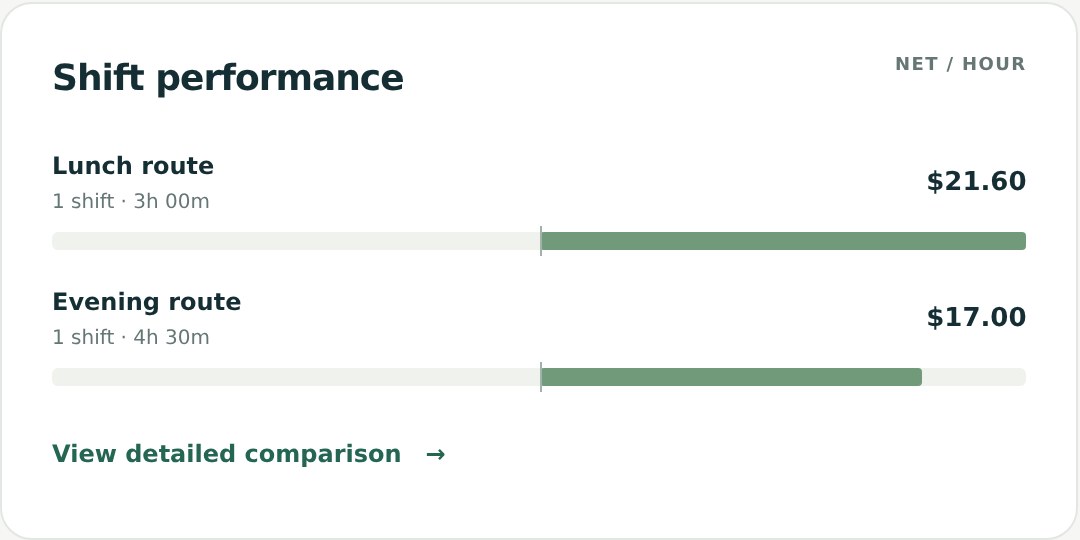
If that shift has 24 miles and chosen operating and maintenance estimates totaling $0.30 per mile, its estimated distance costs are $7.20. Drovm Analysis net is $64.80. That produces $21.60 net per total work hour and $32.40 net per active hour.
Analysis subtracts distance-based operating and maintenance estimates. Separately logged expenses and tax reserves are handled in Overview and are excluded from Analysis. Read the guide to earnings after operating costs before comparing figures that use different cost definitions.
When two delivery apps overlap
If you record one work interval from 9–12 and another from 9:30–11:30, you committed three hours overall. Adding the platform durations would report five hours. Drovm counts overlapping recorded work intervals once for overall results, while retaining each platform’s own hours in platform comparisons. Accurate start times and work durations matter.
Active time is still the sum you recorded. Combined active-hour results and utilization assume those active periods did not overlap. If they did overlap, aggregate active durations alone cannot establish a distinct active timeline. Review the source records; do not interpret the combined figure as unique active time. Drovm shows a dash for utilization if summed active time exceeds combined work time.
Use the numbers in your own shift log
- Save the date, start time, total work time, active time when available, and earnings.
- Review any screenshot import. A trip receipt may supply active time without supplying the whole work session.
- Open Analysis and compare total-hour and active-hour results for the same period.
- Look at shift counts and notes before changing your routine. Missing active time should not be treated as zero activity.
When combining several shifts, divide the combined earnings by the combined relevant hours. A simple average of individual hourly rates gives a short shift the same weight as a long one. For a fuller example, see how to compare delivery shifts.