Start with a complete gross earnings total
Gross delivery earnings are the money recorded before costs and reserves. In a shift log, that may include base pay, tips, bonuses, and other earnings. Check the original record before adding its components: a total payout that already includes a tip should not have that tip added a second time.
The same process works for food, grocery, parcel, courier, and store delivery. Record the pay attributable to the work session and keep your approach consistent. If pay is reported across several shifts, verify the allocation before using it to compare individual shifts.
Give each cost a clear purpose
Distance-based estimates let you account for operating costs and maintenance without pretending that every individual cost is known at the end of a shift. Choose rates that reflect your own vehicle and records. An estimate is a planning input, not an actual bill or a prescribed rate.
- Operating cost estimate: your selected rate per mile or kilometer, such as fuel or electricity. Analysis subtracts this estimate from earnings.
- Maintenance reserve: a separate distance-based allowance for wear and maintenance. Analysis subtracts this allowance too; it does not mean a repair bill was paid during that shift.
- Separately logged expenses: costs such as parking that you record in Expenses. Overview subtracts them for the reporting period; Analysis does not allocate them across shifts.
- Tax reserve: a chosen planning percentage applied to positive Overview net. It reduces estimated keep after costs; it is neither an operating expense nor a calculation or payment of your tax liability.
Avoid counting a cost twice. If a fuel cost is already represented in your operating estimate, logging that same fuel as an additional expense also reduces the Overview result. Decide what your rate covers and use separate expenses for costs outside it.
Is delivery work worth it after gas? Work through one shift
If you are asking whether DoorDash or another delivery service is worth it after gas, start with final earnings, total work time, and the distance recorded for that work. Then calculate fuel use rather than subtracting an entire tank refill from one shift.
Our illustrative lunch route earns $72 in USD over 3 work hours and 24 miles. Suppose the vehicle gets 20 miles per U.S. gallon and fuel costs $4 per gallon. These are sample inputs, not current fuel prices or a claim about a typical vehicle.
Estimated fuel cost = distance ÷ fuel economy × fuel price
24 mi ÷ 20 mpg × $4/gal = $4.80
After fuel alone, $67.20 remains: $22.40 per total work hour. That figure still excludes maintenance and other costs. To carry the same example into Drovm, we use a $0.20-per-mile operating estimate for fuel ($4 ÷ 20 mpg) plus a separate $0.10-per-mile maintenance estimate. These rates are example inputs, not recommendations.
| Step | Calculation | Amount |
|---|---|---|
| Gross earnings | Recorded payout | $72.00 |
| Fuel operating estimate | 24 mi × $0.20 | −$4.80 |
| After gas only | $72 − $4.80 | $67.20 |
| Maintenance estimate | 24 mi × $0.10 | −$2.40 |
| Analysis net | $72 − $4.80 − $2.40 | $64.80 |
| Net per total work hour | $64.80 ÷ 3h | $21.60/hr |
The after-gas row is a subtotal, not another deduction. The $4.80 fuel estimate is already included in the operating cost, so entering it again in Expenses would double-count it. An electric vehicle or e-bike can use an electricity estimate instead, with maintenance considered separately.
Analysis net = gross earnings − estimated distance-based operating costs − estimated maintenance
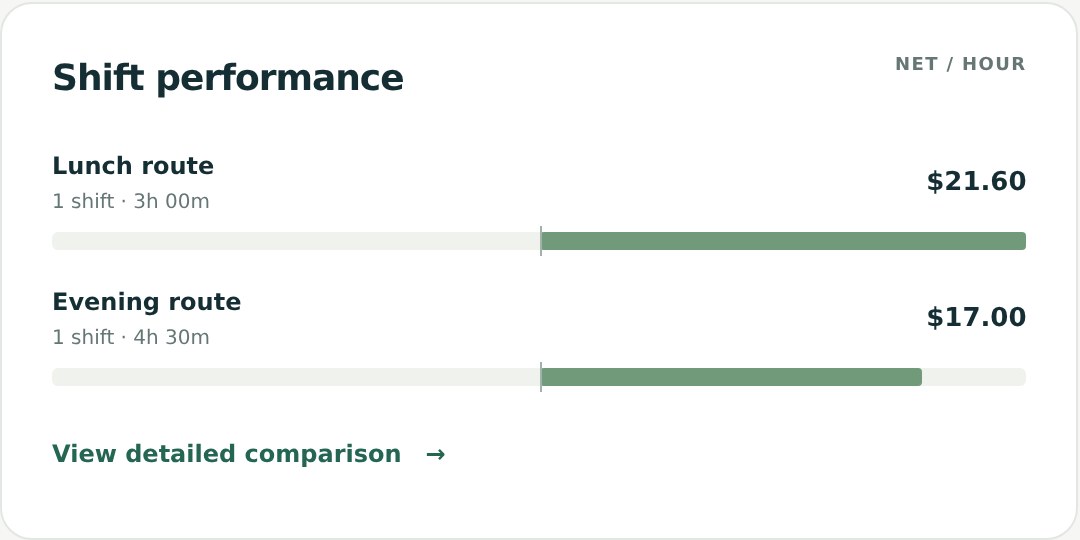
Why Overview can show a different result
Overview also includes separately logged expenses for the selected reporting period and applies your chosen tax reserve. It answers a broader question about the period’s estimated keep. Analysis holds the distance-cost basis consistent across its shift comparisons.
For a period containing only the lunch route, suppose you additionally record $3 of parking that is not covered by either distance-cost estimate. The steps are:
- Analysis net: $72 gross − $4.80 fuel estimate − $2.40 maintenance estimate = $64.80.
- Overview net: $64.80 − $3 separately logged parking expense = $61.80.
- Tax reserve: an illustrative 20% of positive Overview net is $12.36.
- Estimated keep: $61.80 − $12.36 reserved = $49.44.
The 20% rate only demonstrates the selected setting; it is not a recommended tax rate. The $49.44 estimated keep should not be compared directly with $64.80 Analysis net as though they include the same deductions.
Actual costs may differ from your estimates. A reserve is money planned for later, not proof an expense or tax has been paid. Drovm helps organize and compare the inputs you choose; it does not replace your actual financial records.
Choose your currency and distance unit first
In Settings, choose USD, CAD, GBP, AUD, EUR, or NZD, and miles or kilometers. Each currency keeps its own records and goals; Drovm does not convert or combine currencies. Workspace amounts use the selected currency’s symbol. Subscription billing stays in USD.
Switching between miles and kilometers preserves the underlying distances and cost calculations. It should not change the economics of the shift. Compare a cost rate with the unit attached to it; a rate per mile and the same numerical rate per kilometer represent different costs.
Build a repeatable review habit
- Check earnings and any tip breakdown before saving a shift.
- Verify the distance, total work time, and active time if available.
- Review cost settings when your assumptions change. Those settings also affect past shift comparisons.
- Read the metric label before comparing two results: gross, Analysis net, Overview net, or estimated keep.
Next, compare two delivery shifts to see how time and distance can change the conclusion. The active-time guide explains which hours belong in each rate.