A delivery driver earnings tracker records what you earned, how long you worked, and the distance and costs behind that income. Its value comes from connecting those numbers: a $90 shift can bring in more money while producing less per hour than a $72 shift.
Drovm brings delivery records into a shift log and compares performance across platforms, shifts, weekdays, and vehicles. This guide explains what to track, how to read the results, and how to build a routine that helps you decide what work to try again.
What should a delivery driver earnings tracker record?
Start with enough information to explain a shift, not just remember its payout. Use the same definitions each time so your comparisons remain meaningful.
| Record | Why it matters |
|---|---|
| Date and start time | Places the work in the correct reporting period and helps identify overlapping sessions. |
| Platform, vehicle, and shift label | Lets you compare similar work, such as dinner shifts on the same vehicle. |
| Final earnings | Records base pay, tips, bonuses, and other earnings without counting any amount twice. |
| Total work time | Includes time committed to the session, including waits between deliveries, with personal breaks excluded. |
| Active time, when known | Helps distinguish time engaged in deliveries from the wider work session. |
| Distance and completed deliveries | Supports cost estimates and comparisons per mile, kilometer, or delivery. |
| Cost assumptions and extra expenses | Makes clear what has been subtracted and what an hourly result still excludes. |
| A short shift note | Explains unusual conditions, such as a long pickup wait or a route change. |
Keep missing information distinct from zero. If you do not know active time, leave it unknown rather than entering zero. If you worked a verified hour and earned nothing, that hour and its $0 earnings still belong in your overall result.
Why the delivery app’s payout total is only a starting point
A payout answers how much money the platform recorded. It does not, by itself, explain how much of your day the work used, what your vehicle cost, or whether another shift made better use of your time.
For example, $80 earned over four total work hours is $20 per hour before costs. If only two of those hours were active delivery time, the same session also produced $40 per active hour. Neither calculation changes the $80 payment; they answer different questions.
Use total work hours when assessing the return on the time you committed. Use active hours as an additional measure of how the session unfolded. Our active time versus total time guide explains how to keep those measures separate.
A worked example: the larger payout earns less per hour
These two fictional shifts use the same illustrative distance-cost assumption: $0.20 per mile for operating costs plus $0.10 per mile for maintenance. The combined $0.30 rate is an example, not a recommended rate for your vehicle or a tax deduction rate.
| Recorded result | Lunch | Evening |
|---|---|---|
| Gross earnings | $72.00 | $90.00 |
| Total work time | 3 hours | 4 hours 30 minutes |
| Distance | 24 miles | 45 miles |
| Estimated distance costs | $7.20 | $13.50 |
| Earnings after distance costs | $64.80 | $76.50 |
| After-distance-cost earnings per total hour | $21.60 | $17.00 |
The evening shift leaves $11.70 more after distance costs, but it takes 90 minutes longer. Lunch earns $4.60 more per total work hour. Which result matters more depends on whether you are trying to maximize your hourly return, reach a dollar target, or fit delivery work into a limited schedule.
After-distance-cost earnings per hour = (gross earnings − distance costs) ÷ total work hours
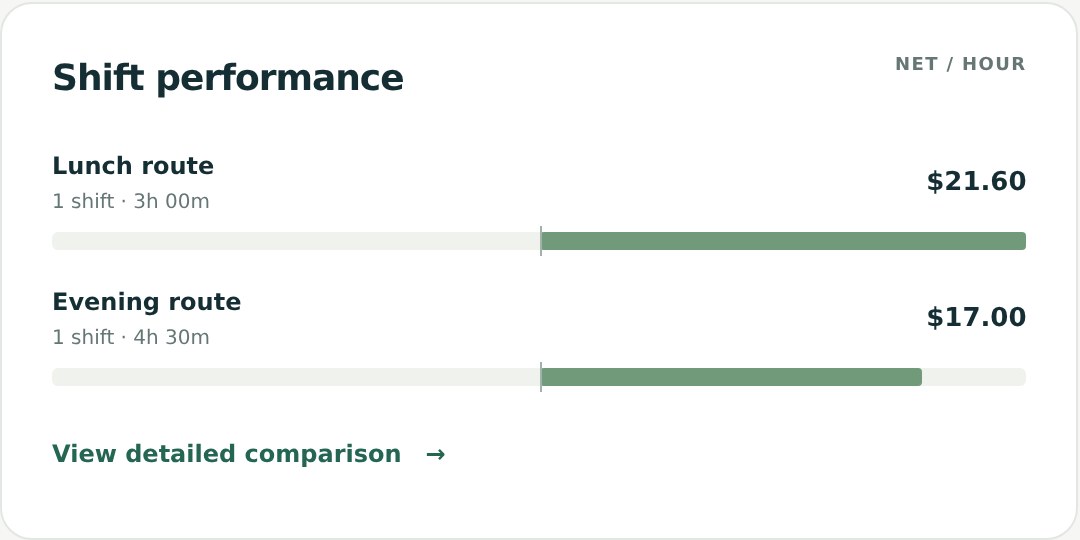
Two shifts are a reason to investigate, not enough evidence to rewrite your schedule. Record more comparable sessions and check whether the pattern repeats.
Separate gross earnings, Analysis net, and estimated take-home
Gross earnings are your recorded income before costs. In Drovm Performance Analysis, net earnings subtract your distance-based operating and maintenance estimates. Separately logged expenses and tax reserves are excluded from those shift comparisons.
Overview’s What you keep breakdown separates operating costs, maintenance, logged expenses, estimated net, tax reserve, and estimated take-home. Read the component lines before treating a displayed amount as money available to spend. A planning reserve is not a calculation of your actual tax liability.
Keep the assumptions consistent. If a cost is already covered by your per-mile estimate, do not subtract the same amount again as an additional expense. The costs and expenses guide explains where these inputs belong.
Track multi-app work without adding the same hours twice
Suppose you use DoorDash from 9 a.m. to noon and Uber Eats from 10 a.m. to 1 p.m. Each app covers three hours, but the combined workday covers four hours. Adding the two app durations would report six hours and understate your overall hourly earnings.
Drovm uses recorded start times and work intervals to account for overlapping work time overall, while retaining each platform’s own hours for platform comparisons. Missing start times limit that calculation. Active time is summed separately; combined utilization assumes the recorded active periods did not overlap.
Add each platform’s earnings once and avoid counting shared work distance twice in your overall cost estimate. See the multi-app earnings guide for a fuller example.
How to start tracking delivery earnings in Drovm
- Choose your currency and distance unit. Set miles or kilometers and the currency used on your earnings statements. Currency records stay separate; Drovm does not perform exchange-rate conversion.
- Set useful labels and costs. Choose platform, vehicle, and shift labels you can use consistently. Add operating and maintenance estimates that fit your vehicle.
- Log a completed session. Enter its date, start time, total work time, earnings, deliveries, and distance. Add verified active time when available.
- Check the saved result. Compare gross earnings with your source statement, confirm the units, and correct missing or duplicated information.
- Review several sessions together. Compare similar shifts, read the shift counts, and use the result to choose one practical change to test.
You can enter records manually or review a supported screenshot import. Tested layouts include DoorDash shift summaries and Uber Eats examples. Import creates a draft to check; complete missing fields and confirm the totals before saving. An individual trip or a multi-day summary should not be mistaken for one complete shift.
The first-shift guide and screenshot review guide provide the detailed steps. Drovm does not require delivery-app passwords or account linking.
Earnings tracker, spreadsheet, or mileage app?
A spreadsheet can be enough if you consistently record the inputs and maintain the formulas. An earnings tracker becomes useful when you want repeatable comparisons across more shifts, platforms, or vehicles without rebuilding each report.
A mileage app serves a different primary need: recording travel. Drovm uses distance you enter or review from a screenshot to support earnings and cost analysis. Automatic GPS mileage tracking is not included. If you already use a mileage log, its verified distance totals can supply that part of your shift record.
Choose based on the work you need the tool to do. If your main problem is forgetting to record trips, prioritize a reliable distance-recording routine. If you already have distance and payout records but cannot tell which shifts performed better, focus on hourly and cost comparisons.
Frequently asked questions
Can I track more than one delivery platform?
Yes. Drovm lets you customize platform and vehicle labels for your delivery work. Manual shift records are not limited to the screenshot layouts the reader recognizes. Keep each platform’s records clear and check overlapping time when reviewing the combined day.
Will an earnings tracker make me more money?
It can help you identify a pattern worth testing, such as a shift with lower costs or less waiting. It cannot create demand or guarantee better offers. Compare the next several sessions to see whether a change actually helped.
Is Drovm free to try?
Drovm offers a 14-day free trial with no card required and no automatic charge. Saved history remains viewable in read-only mode when trial access ends. See current plans and trial details before choosing access.
Start with one question about your next week
Choose a question your records can answer: does lunch outperform dinner per total hour, does one platform require more miles, or is waiting reducing the return from an otherwise attractive shift? Save consistent records, compare enough sessions to see a pattern, and use that evidence to decide what to try next.